
We receive multiple EOBs that have one virtual credit card lump sum payment with 2-3 patient payments. How should I run these payments?
Follow the steps for processing Insurance EOB Payments, creating multiple payments with correct allocations for each patient separately.
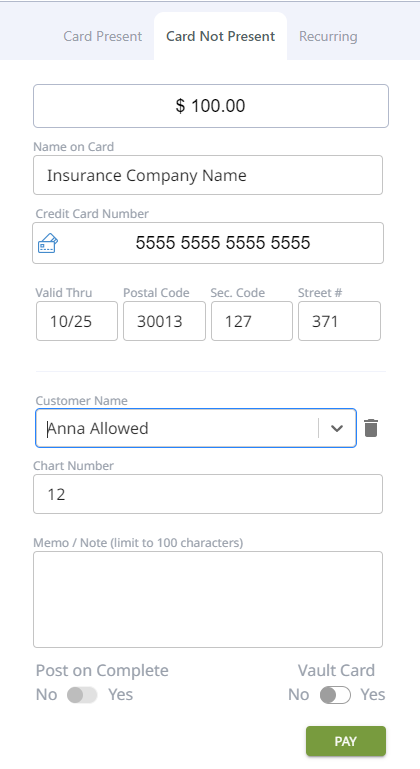
- Pull up the patient this payment applies to, or if using integration, select the patient in your practice management, and bring them over to DTPayments
- Pull the correct patient up in the "card not present" window (Anna Allowed is the patient in this sample)
- Enter the correct ALLOCATION AMOUNT for the current patient.
- Enter the Name of the insurance company in name field
- Enter credit card number, and as much information as they provide (exp date, sec code, etc)
- Post the payment to your practice management if you are using integration
- You can double check your amounts by looking at the Payments Report to make sure it balances to your total.